
AI for Small Business study guide · Lesson 5 of 8
Operations, Automation, and Agents
Document Operations and Repetitive Work · Automate Carefully and Introduce Agents
This is the lesson's study guide from the FlashFeed app, plus its key facts and a self-test.
What you'll be able to do
- Capture an experienced worker's real process, including happy paths and exceptions, as a testable standard operating procedure.
- Distinguish rule-based automation from an AI agent and place human approval before consequential actions.
Operations
Much of a small business lives in the owner's head. AI can help turn demonstrations, voice notes, meeting transcripts, and rough checklists into usable operating documentation.
Capture the real process. Narrate a task while doing it or interview the person who performs it. Ask AI to organize the material into purpose, inputs, steps, decisions, outputs, safety controls, and exceptions. The experienced worker—not the model—is the authority.
A standard operating procedure includes the happy path and the exception paths. What happens when a field is blank, a customer objects, an item is unavailable, or the primary system fails? Clean lists that omit exceptions create brittle automation.
Test the procedure with a different person. Observe where they pause, guess, or need undocumented access. Revise it, assign an owner, and set a review date. Documentation is a maintained operating asset.
AI meeting notes are useful when they distinguish decisions, action items, owners, deadlines, and unresolved questions. Always tell participants when recording or transcription is used and follow applicable policy and law.
Automation
Rule-based automation follows a predefined trigger and action. An AI agent can choose steps and use tools toward a goal. Greater flexibility creates greater need for boundaries.
Start with permissions. Decide what a workflow may read, create, change, send, spend, or delete. Use least privilege: provide only the access needed. Put consequential actions—payments, external messages, record changes, account changes—behind an approval gate.
Keep logs showing inputs, outputs, actions, errors, and approvals. Include a kill switch so a responsible person can stop the workflow immediately. Pilot with limited data and a limited audience before expanding.
Move in stages: document, simplify, draft, compare, control, then automate. This sequence feels slower than a flashy demonstration and is much faster than repairing an automation that quietly performed the wrong task at scale.
Find the hidden decisions
When documenting a process, ask the experienced worker where they pause, inspect, call someone, or make an exception. Those moments often contain the real expertise. “Send the estimate” may hide decisions about minimum margin, travel distance, available capacity, customer history, and required approval.
Ask AI to turn a transcript into a draft procedure, then mark every uncertain rule with a question instead of filling the gap. Resolve those questions with the process owner. Add screenshots or examples only when you have the right to share and maintain them.
Choose the right level of automation
Not every improvement needs an agent. A template may be enough. A rule-based integration may reliably copy form submissions into a CRM. AI becomes useful when the workflow must interpret variable text, classify an exception, summarize information, or draft a response.
Use a permissions table with rows for read, create, edit, send, spend, and delete. For each, state whether the workflow is prohibited, allowed, or allowed only after approval. Begin with read and draft permissions. Expand only when measured performance justifies it.
Test failure conditions: missing files, duplicate events, conflicting records, unavailable services, unusually large amounts, and malicious instructions hidden in incoming content. Confirm that retries do not send duplicate messages or payments.
Assign an owner who checks logs and exceptions. Automation without ownership becomes invisible operational debt.
Key terms
- Standard operating procedure
- A maintained description of how to perform a recurring task, including steps, responsibilities, controls, and exceptions.
- Approval gate
- A required human confirmation before a workflow performs a consequential action.
Key facts
Capture the Real Process
The fastest way to draft a procedure is often to narrate the task while doing it, then have AI organize the transcript into steps, decisions, and exceptions.
Exceptions Are Part of the Procedure
A clean happy-path checklist is incomplete. Good operating documentation explains what to do when information is missing, a customer objects, or a system fails.
Meetings Need Owners and Deadlines
AI summaries become operationally useful when decisions, action items, owners, due dates, and unresolved questions are separated clearly.
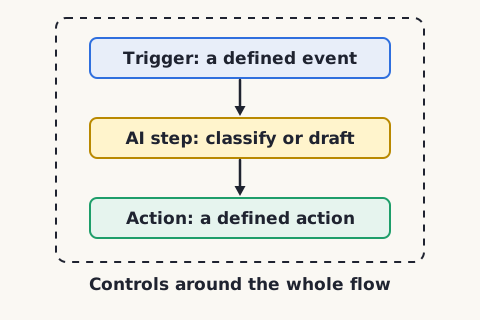
Automation Starts with a Trigger
A basic automation follows a rule: when a defined event occurs, perform a defined action. AI can classify or draft inside that flow, but the surrounding controls still matter.
Agents Need Boundaries
An agent may choose steps and use tools toward a goal. Limit what it can read, change, send, spend, or delete, and require approval for consequential actions.
Keep an Audit Trail
Logs make it possible to see what ran, what information was used, what the AI proposed, what action occurred, and who approved it.
Matched pairs
Each item on the left goes with the one on the right.
- Happy path
- The normal sequence when nothing unusual happens
- Exception path
- Instructions for unusual conditions or failures
- Rule-based automation
- A predefined trigger and action sequence
- AI agent
- A system that can select steps and use tools toward a goal within permissions
Step by step
Create and test an AI-assisted procedure
- Observe or record the task being performed
- Draft the steps, decisions, inputs, and outputs
- Add safety checks and exception paths
- Have an experienced person review it
- Ask a different person to follow it
- Revise and assign an owner and review date
A procedure is not finished until someone else can use it successfully.
Move a workflow toward automation
- Document the current workflow
- Remove unnecessary steps and clarify rules
- Run AI in draft-only mode
- Measure errors and identify exceptions
- Add permissions, approval gates, and logs
- Increase autonomy gradually and keep a kill switch
Do not automate a process you cannot explain or evaluate.
Self-test
Answer each question from memory, then check your work against the answer key.
1. What is the strongest source for a new procedure?
- AThe actual process demonstrated by an experienced worker
- BA generic AI answer about the industry
- CAn old checklist no one follows
- DA competitor's marketing page
2. In a standard operating procedure, what does the exception path describe?
- AThe normal sequence followed when nothing unusual happens
- BInstructions for unusual conditions or failures
- CA required human confirmation before spending money
- DA predefined trigger and matching automatic action
3. Which of these is NOT something a well-formed operating procedure should include?
- AException paths for missing information or failures
- BAn assigned owner and a review date
- CSteps, decisions, and safety controls
- DA guarantee that no experienced worker input is ever needed
4. When AI drafts a procedure from a transcript, what should you do with rules you are unsure about?
- ALet the model fill the gap with its best guess so the draft stays complete
- BShip the draft and fix problems only after users report them
- CMark each uncertain rule with a question and resolve it with the process owner
- DDrop the uncertain step to keep the happy path clean
5. After drafting a procedure, how should you check that it actually works?
- AHave the author reread it for missing steps
- BTest it with a different person and watch where they pause or guess
- CAsk the AI to check its own draft for gaps
- DTime how long the author takes to follow it
6. Which action should normally require approval in a beginner business automation?
- AExtracting dates from a document
- BDrafting an internal summary
- CSending a refund from the business account
- DLabeling an email for review
7. What distinguishes an AI agent from rule-based automation?
- AIt can choose steps and use tools toward a goal
- BIt follows one predefined trigger and one fixed action
- CIt only copies form submissions into a CRM
- DIt never requires any permissions or boundaries
8. What is an approval gate in an automated workflow?
- AA rule that triggers an action automatically with no review
- BThe least amount of access a workflow is granted
- CA log recording inputs, outputs, actions, and errors
- DA required human confirmation before a consequential action
9. Following least privilege, which permissions should a beginner automation usually start with?
- AUnlimited access to every connected system
- BDelete and account-change permissions
- CFull send and spend permissions
- DRead and draft permissions
10. For which task is simple rule-based automation usually enough, with no AI agent needed?
- ASummarizing a long meeting transcript
- BClassifying an ambiguous customer exception
- CCopying new form submissions into a CRM
- DDrafting a tailored reply to unusual feedback
Go deeper
Answer key
- 1. A The actual process demonstrated by an experienced workerAI can organize knowledge, but the source should be the real process and people who understand it.
- 2. B Instructions for unusual conditions or failuresThe exception path covers unusual conditions or failures (blank field, objection, system down). The normal sequence is the happy path.
- 3. D A guarantee that no experienced worker input is ever neededThe experienced worker, not the model, is the authority, so their input is essential. Good procedures do include steps, exceptions, an owner, and a review date.
- 4. C Mark each uncertain rule with a question and resolve it with the process ownerMark every uncertain rule with a question instead of filling the gap, then resolve it with the process owner. Guessing hides the real expertise.
- 5. B Test it with a different person and watch where they pause or guessTesting with a different person reveals where they pause, guess, or need undocumented access. The author's reread or timing, or an AI check, cannot show where a newcomer gets stuck.
- 6. C Sending a refund from the business accountMoving money is consequential and should stay behind a human approval gate.
- 7. A It can choose steps and use tools toward a goalAn agent selects steps and uses tools toward a goal, while rule-based automation runs a predefined trigger and action. That flexibility is why agents need firmer boundaries.
- 8. D A required human confirmation before a consequential actionAn approval gate is a required human confirmation before consequential actions like payments or external messages. Logs and least privilege are separate controls.
- 9. D Read and draft permissionsLeast privilege means beginning with read and draft permissions and expanding only when measured performance justifies it. Send, spend, and delete are the riskiest.
- 10. C Copying new form submissions into a CRMRule-based automation reliably handles fixed triggers like copying form submissions. AI earns its place only when a workflow must interpret variable text, classify exceptions, summarize, or draft.
Sources
- U.S. Small Business Administration — AI for small business — www.sba.gov/business-guide/manage-your-business/ai-small-business
- NIST — Generative AI Profile (NIST AI 600-1) — nvlpubs.nist.gov/nistpubs/ai/NIST.AI.600-1.pdf
Image credits
- Automation Starts with a Trigger: FlashFeed original diagram · CC-BY-4.0