
AI for Everyone study guide · Lesson 4 of 14
From Chatbots to Agents
The Agent Loop · Tools, State, and Permissions · Human Approval Checkpoints · Agent Failure Modes
This is the lesson's study guide from the FlashFeed app, plus its key facts and a self-test.
What you'll be able to do
- Design bounded agent workflows with tools, permissions, checkpoints, and explicit stopping conditions.
The Agent Loop
An agent is more than a chat response. It pursues a goal across multiple steps, selects actions or tools, observes results, and decides whether to continue. The surrounding software—not the language model alone—usually manages state, permissions, tool calls, and termination.
A practical loop is plan, act, observe, check, then stop or revise. Every loop needs a definition of done and a limit on attempts, time, or cost. Without those boundaries, a system can repeat a failed action, expand its scope, or consume resources without improving the result.
Three ideas to retain:
- Agents Operate Across Steps: A goal-directed agent can select tools, inspect results, update state, and choose a next action instead of waiting for a new user message each time.
- Software Holds the Boundaries: The agent harness commonly supplies tools, permissions, memory, logs, and stop logic around the model.
- Every Loop Needs an Exit: A success condition plus limits on attempts, time, and cost keeps a stalled workflow from running indefinitely.
Key term: Agent observation means “the result returned after an action.”
Tools, State, and Permissions
Tools turn text into action: search, files, calendars, databases, code execution, or messages. State lets the workflow remember what happened. Permissions determine which resources and operations are available. These are product and security decisions, not merely prompt details.
Use least privilege. A research agent may need read access to a folder but not permission to delete it; a draft assistant may prepare an email without sending it. Separate read, create, update, send, and delete capabilities wherever the platform allows.
Three ideas to retain:
- Tools Create Real Effects: A model response becomes consequential when connected to search, files, databases, code, purchases, or communication channels.
- State Records the Journey: Workflow state can track inputs, actions, observations, approvals, and remaining work across steps.
- Least Privilege Limits Damage: Grant only the data and actions needed for the current task, for only as long as needed.
Key term: Read permission means “ability to inspect without changing data.”
Human Approval Checkpoints
Human-in-the-loop is useful only when the human sees the right information at the right moment. Place approval before money moves, data is deleted, messages are sent, records change, or a high-stakes recommendation reaches a decision maker.
A rubber-stamp screen is not a safeguard. Show the proposed action, relevant evidence, uncertainty, and expected effect; give the reviewer time and authority to reject it. Lower-risk reversible steps can run automatically while consequential steps pause.
Three ideas to retain:
- Review Belongs Before Consequence: An approval is most valuable before an action becomes costly, external, legally significant, or difficult to reverse.
- Reviewers Need Evidence: A useful checkpoint shows what will happen, why, which inputs support it, and what uncertainty remains.
- Automation Can Be Tiered: Low-risk reversible work may proceed automatically while sensitive, destructive, financial, or public actions require explicit approval.
Key term: Approval gate means “a required human decision before an action.”
Agent Failure Modes
Agents can pursue the wrong interpretation, call the wrong tool, trust hostile content, repeat a failed action, or report success without verifying the result. Because steps compound, a small early mistake can shape every later action.
Design for failure: validate tool inputs and outputs, isolate untrusted content from instructions, log actions, make writes reversible, cap retries, and create an escalation path. Test ordinary failures and adversarial cases before expanding authority.
Three ideas to retain:
- Errors Compound Across Steps: A mistaken plan or contaminated observation can influence every later decision in a multi-step workflow.
- External Content Can Be Hostile: A webpage, email, or document may contain instructions intended to redirect an agent. Treat retrieved content as data, not trusted control text.
- Logs Enable Reconstruction: Action and approval logs help reviewers see what happened, diagnose failure, and improve the workflow.
Key term: Agent drift means “movement away from the user's intended goal.”
Sources
Key terms
- AI agent
- A goal-directed system that can choose and execute actions across multiple steps.
- Least privilege
- Giving a user or system only the minimum access needed for its task.
- Human-in-the-loop
- A workflow in which a person reviews, directs, or approves selected system actions.
- Prompt injection
- Untrusted content designed to override or redirect an AI system's instructions.
Key facts
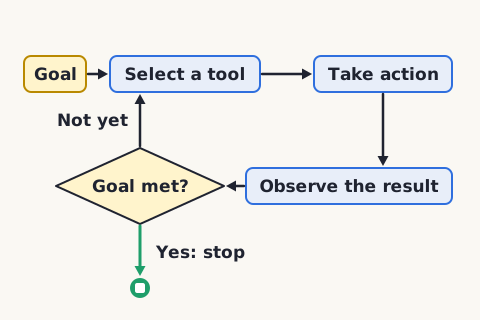
Agents Operate Across Steps
A goal-directed agent can select tools, inspect results, update state, and choose a next action instead of waiting for a new user message each time.
Software Holds the Boundaries
The agent harness commonly supplies tools, permissions, memory, logs, and stop logic around the model.
Every Loop Needs an Exit
A success condition plus limits on attempts, time, and cost keeps a stalled workflow from running indefinitely.
State Records the Journey
Workflow state can track inputs, actions, observations, approvals, and remaining work across steps.
Least Privilege Limits Damage
Grant only the data and actions needed for the current task, for only as long as needed.

Reviewers Need Evidence
A useful checkpoint shows what will happen, why, which inputs support it, and what uncertainty remains.
Automation Can Be Tiered
Low-risk reversible work may proceed automatically while sensitive, destructive, financial, or public actions require explicit approval.
External Content Can Be Hostile
A webpage, email, or document may contain instructions intended to redirect an agent. Treat retrieved content as data, not trusted control text.
Logs Enable Reconstruction
Action and approval logs help reviewers see what happened, diagnose failure, and improve the workflow.
Matched pairs
Each item on the left goes with the one on the right.
- Agent observation
- The result returned after an action
- Stop condition
- A rule that ends the agent loop
- Read permission
- Ability to inspect without changing data
- Write permission
- Ability to create or modify data
- Approval gate
- A required human decision before an action
- Reversible action
- A change that can be safely undone
- Agent drift
- Movement away from the user's intended goal
- Escalation path
- A route to human help when the workflow cannot proceed safely
Step by step
Bound an agent loop
- State the goal and definition of done
- List allowed tools and actions
- Set attempt, time, and cost limits
- Check each observation against the goal
- Stop, escalate, or revise when a limit is reached
A loop that cannot explain when it should stop is not ready to run unattended.
Set permissions for an agent
- List every required resource
- Separate read, create, update, send, and delete actions
- Remove capabilities the goal does not need
- Require approval for consequential operations
- Revoke temporary access when the task ends
Permission boundaries should be enforced by the surrounding system, not only requested in prose.
Test an agent before wider use
- Run representative normal tasks
- Simulate missing and malformed tool results
- Insert hostile instructions in retrieved content
- Verify logs, limits, and approval gates
- Expand authority only after failures are contained
Test the control system around the model, not just the quality of its prose.
Self-test
Answer each question from memory, then check your work against the answer key.
1. What most distinguishes an agent?
- AA friendly chat tone
- BMulti-step action toward a goal
- CA long context window
- DA humanlike avatar
2. What prevents an endless loop?
- AAn explicit stop condition
- BA hidden greeting
- CA longer role prompt
- DMore adjectives
3. What access should a summarizer get?
- APayment authority
- BDelete access to every folder
- CAll company passwords
- DRead access to the chosen files
4. Why separate draft from send?
- ADrafts cannot be reviewed
- BDrafting uses no language
- CSending has an external effect
- DSending improves accuracy
5. Which action most needs approval?
- ASending a payment
- BRenaming a scratch heading
- CSuggesting file tags
- DSorting local draft notes
Go deeper
- WatchData, Not Orders A webpage may contain instructions meant to redirect an artificial intelligence agent. An email or a document may too.
- StudyAI for Everyone in the FlashFeed app
Answer key
- 1. B Multi-step action toward a goalAgency comes from a loop that selects and executes actions.
- 2. A An explicit stop conditionThe workflow needs success and limit rules.
- 3. D Read access to the chosen filesThe task requires reading selected inputs, not broad authority.
- 4. C Sending has an external effectA send action affects another person and merits stronger control.
- 5. A Sending a paymentA payment has financial consequence and may be hard to reverse.
Sources
- OpenAI — A practical guide to building agents — openai.com/business/guides-and-resources/a-practical-guide-to-building-ai-agents/
- NIST — Strengthening AI agent hijacking evaluations — www.nist.gov/news-events/news/2025/01/technical-blog-strengthening-ai-agent-hijacking-evaluations
- NIST — Generative AI Profile — www.nist.gov/publications/artificial-intelligence-risk-management-framework-generative-artificial-intelligence
Image credits
- Agents Operate Across Steps: FlashFeed original diagram · CC-BY-4.0
- Reviewers Need Evidence: AI-generated (gpt-image-1.5)