
AI for Small Business study guide · Lesson 2 of 8
Prompting as Business Communication
Give AI Context and a Clear Target · Iterate, Critique, and Reuse
This is the lesson's study guide from the FlashFeed app, plus its key facts and a self-test.
What you'll be able to do
- Write an AI brief with a clear task, relevant context, the audience, constraints, and the expected output.
- Improve weak output through critique, added examples, and reusable prompt-library assets rather than repeated one-shot prompting.
Context
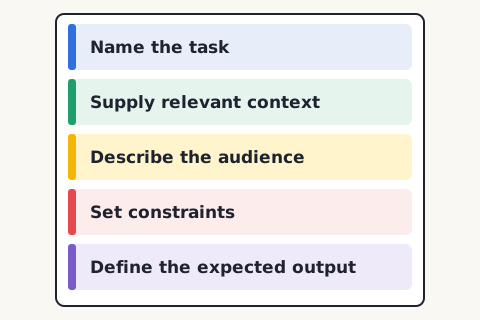
A prompt is not a magic phrase. It is a short business brief. Useful requests usually contain five ingredients: the task, the relevant context, the audience, constraints, and a description of the expected output.
Compare “write a customer email” with a real brief: “Draft a 120-word reply to a customer whose order is delayed. Use the shipping policy below. Acknowledge the inconvenience, do not promise a delivery date, offer tracking and cancellation as next steps, and use our calm, direct tone.” The second request is better because the work is defined.
Examples are often stronger than adjectives. An approved email can show rhythm, warmth, terminology, and level of detail better than “sound professional.” Before sharing examples, remove personal, confidential, or unnecessary information.
Define acceptance criteria before reading the answer. Criteria might include required facts, maximum length, a specified format, prohibited claims, links that must be checked, or a policy that must be followed. Criteria make review faster and reduce the temptation to approve an answer merely because it sounds polished.
For complex work, let the AI ask questions before drafting. A proposal, plan, or customer communication may depend on details you forgot to include. “Ask up to five questions before you begin” turns missing context into a visible step.
Iteration
Treat the first response as a draft. Compare it with the criteria, identify the most important weakness, provide missing context or an example, and request a focused revision. A working conversation usually outperforms a single elaborate command.
Separate the draft pass from the critique pass. First create a workable version. Then ask for weaknesses against explicit criteria, unsupported claims, missing edge cases, or language that does not match the audience. Finally, perform the human edit. AI should help you see options; it should not make you less attentive.
When a workflow succeeds, save more than the final output. A useful prompt library stores the instructions, source material, good examples, acceptance checklist, and owner. Date the entry because tools, policies, and business facts change.
Credible practical educators reinforce this conversational approach. Ethan Mollick's current guides emphasize supplying context, using AI on work you understand, and checking errors. OpenAI Academy's small-business materials use a similar Goal–Context–Output–Boundary checklist. The durable idea is not a secret prompt; it is clear communication plus informed review.
Build a request from real work
Start with a task you can judge, such as replying to a new inquiry. Gather one approved reply, the current service area, the response-time promise, and the questions that must be answered before quoting. Ask the AI to draft a response using only that information. Require it to mark missing details rather than invent them.
Review the draft in layers. First check factual accuracy and policy. Next check whether the response advances the customer's next step. Then edit tone and wording. Reviewing substance before style prevents a common failure: polishing a message whose underlying promise is wrong.
If the output disappoints, diagnose the gap. A wrong fact may mean the source material was missing or ignored. Generic language may mean the audience and examples were vague. A bad structure may mean the expected format was undefined. An unsafe promise may mean the constraints were incomplete. Diagnosis produces a reusable improvement; asking for “better” does not.
Maintain the library
Each saved workflow should have a name, owner, purpose, approved inputs, prohibited data, current instructions, examples, checklist, and review date. Test it when a model changes or a business policy changes. Archive instructions that no longer work.
Do not treat a prompt library as a bag of spells copied from social media. Its value comes from encoding your business knowledge and review standard. A prompt that works for a dentist, restaurant, or HVAC company may fail for your customer, risk, and voice.
Key terms
- Acceptance criteria
- Specific conditions an output must satisfy before it is considered usable.
- Prompt library
- A maintained collection of tested instructions, examples, and checklists for recurring work.
Key facts
Prompt Like a Brief
A useful request names the task, supplies relevant context, describes the audience, sets constraints, and defines the expected output.
Examples Beat Adjectives
A real email, proposal, or response often communicates your voice more clearly than instructions such as 'make it professional.' Remove sensitive details before sharing examples.
Define Done
Acceptance criteria make quality review faster. Specify required facts, length, format, tone, prohibited claims, and what the output must help someone do.
Use a Working Conversation
Strong results usually emerge through questions, critique, and revision. Treat the first answer as material to improve, not a final deliverable.
Let the AI Ask Questions
When important context is missing, instruct the AI to ask a few questions before drafting. This is especially useful for proposals, plans, and customer communications.
Save the Pattern, Not Just the Output
When a workflow succeeds, save the instructions, source documents, examples, and review checklist. That package is more reusable than one finished draft.
Matched pairs
Each item on the left goes with the one on the right.
- Task
- The job you want the AI to perform
- Context
- Business information needed to perform the task well
- Draft pass
- Create a workable first version
- Critique pass
- Identify weaknesses against explicit criteria
Step by step
Write a reusable AI brief
- State the task
- Describe the audience and business context
- Attach or paste trusted source material
- Set constraints and approval boundaries
- Define the output format and acceptance criteria
Store successful briefs so the team does not reinvent them every time.
Improve an AI draft
- Compare the draft with acceptance criteria
- Point out the most important gap
- Provide missing context or an example
- Request a focused revision
- Perform the final human edit and approval
Change one important variable at a time so you learn what improves the result.
Self-test
Answer each question from memory, then check your work against the answer key.
1. Which request is most likely to produce a usable customer email?
- AWrite something friendly about our policy
- BDraft a 120-word reply to a delayed-order complaint using the policy below; acknowledge the delay, avoid promising a date, and offer two next steps
- CAct as the world's best marketer
- DWrite an email
2. A useful AI request usually contains which five ingredients?
- ATask, context, audience, constraints, and expected output
- BModel, temperature, token limit, seed, and format
- CGreeting, body, closing, subject line, and attachment
- DKeywords, tone, length, deadline, and signature
3. Specific conditions an output must satisfy before it is considered usable are called:
- AThe draft pass
- BA prompt library
- CAcceptance criteria
- DContext
4. Why include an approved example email in a brief instead of only saying 'sound professional'?
- AIt lets the AI skip reading the constraints
- BIt guarantees the output needs no human review
- CIt uses fewer tokens than writing adjectives
- DIt shows rhythm, warmth, terminology, and level of detail better than adjectives
5. Acceptance criteria might specify all of the following EXCEPT:
- AA policy that must be followed
- BRequired facts the output must include
- CA maximum length or specified format
- DThe model's temperature and random seed
6. An AI reply has the right facts but arrives as one long paragraph when you needed a table. What was most likely undefined in the brief?
- AThe constraints on promises
- BThe expected output format
- CThe business context
- DThe audience for the reply
7. An AI draft is generic and misses your differentiator. What is the best next move?
- APublish it and improve next month
- BSwitch tools immediately
- CAdd specific business context and a good example, then revise
- DAsk for more enthusiasm
8. A maintained collection of tested instructions, examples, and checklists for recurring work is called a:
- APrompt library
- BCritique pass
- CAcceptance criterion
- DDraft pass
9. During the critique pass of an AI conversation, what should you do?
- ACreate the first workable version
- BIdentify weaknesses against explicit criteria
- CDelete the draft and start over
- DPublish the output to save time
10. When a workflow succeeds, what is most valuable to save?
- AThe instructions, source material, examples, checklist, and owner
- BThe AI's temperature setting
- CA screenshot of the chat window
- DOnly the final polished draft
11. A draft makes an unsafe promise to a customer. Using the diagnosis approach, what was most likely incomplete?
- AThe maximum length
- BThe expected output format
- CThe constraints
- DThe approved example emails
12. A prompt finally produces reliable customer emails. What should you save so the workflow is reusable?
- ANothing; regenerate from scratch each time
- BOnly the final email you liked
- CA screenshot of the AI conversation
- DInstructions, sources, examples, and checklist together
13. Which practice keeps a saved prompt-library entry useful as models and policies change?
- ASharing prompts without an owner listed
- BCopying popular prompts from social media
- CDating entries and retesting when policy or model changes
- DDeleting the checklist after the first success
Go deeper
Answer key
- 1. B Draft a 120-word reply to a delayed-order complaint using the policy below; acknowledge the delay, avoid promising a date, and offer two next stepsThe strongest request supplies task, context, constraints, and a concrete output target.
- 2. A Task, context, audience, constraints, and expected outputA good prompt is a short business brief with the task, relevant context, the audience, constraints, and the expected output.
- 3. C Acceptance criteriaAcceptance criteria are the specific conditions an output must meet to be usable; a prompt library and draft pass are separate concepts.
- 4. D It shows rhythm, warmth, terminology, and level of detail better than adjectivesExamples communicate voice and detail more concretely than adjectives. They do not remove the need for review, and sensitive details should be stripped first.
- 5. D The model's temperature and random seedCriteria cover required facts, length, format, prohibited claims, and policies. Model temperature and seed are technical settings, not acceptance criteria.
- 6. B The expected output formatA bad structure may mean the expected format was undefined. The facts were right, so context is not the gap; naming the format, such as a table, fixes the shape.
- 7. C Add specific business context and a good example, then reviseGeneric output usually signals missing context or examples, not necessarily the wrong tool.
- 8. A Prompt libraryA prompt library stores tested instructions, examples, and checklists for reuse. The other terms name single steps or conditions, not the stored collection.
- 9. B Identify weaknesses against explicit criteriaThe critique pass checks the draft against explicit criteria for weaknesses and unsupported claims. Creating the first workable version is the draft pass.
- 10. A The instructions, source material, examples, checklist, and ownerSaving the full pattern (instructions, sources, examples, checklist, owner, and date) is more reusable than keeping just one finished output.
- 11. C The constraintsAn unsafe promise signals incomplete constraints. A wrong fact points to missing sources, generic language to vague examples, and bad structure to an undefined format.
- 12. D Instructions, sources, examples, and checklist togetherA reusable prompt-library asset saves the full package -- instructions, sources, examples, and checklist -- not just one finished output.
- 13. C Dating entries and retesting when policy or model changesDating entries and retesting them when a model or policy changes keeps a prompt-library asset trustworthy over time.
Sources
- OpenAI Academy — Small Business Resource Hub — academy.openai.com/en/public/resources/openai-academy-small-business-resource-hub-2026-06-03
- Ethan Mollick — Using AI Right Now: A Quick Guide — www.oneusefulthing.org/p/using-ai-right-now-a-quick-guide
Image credits
- Prompt Like a Brief: FlashFeed original diagram · CC-BY-4.0